
Click your workspace chip at the bottom of the left sidebar to open the workspace menu: Workspace settings, Connect your AI, and Sign out.

Brand details and team

Workspace settings holds your brand name, contact email, and website, plus everyone on your team who can sign in.
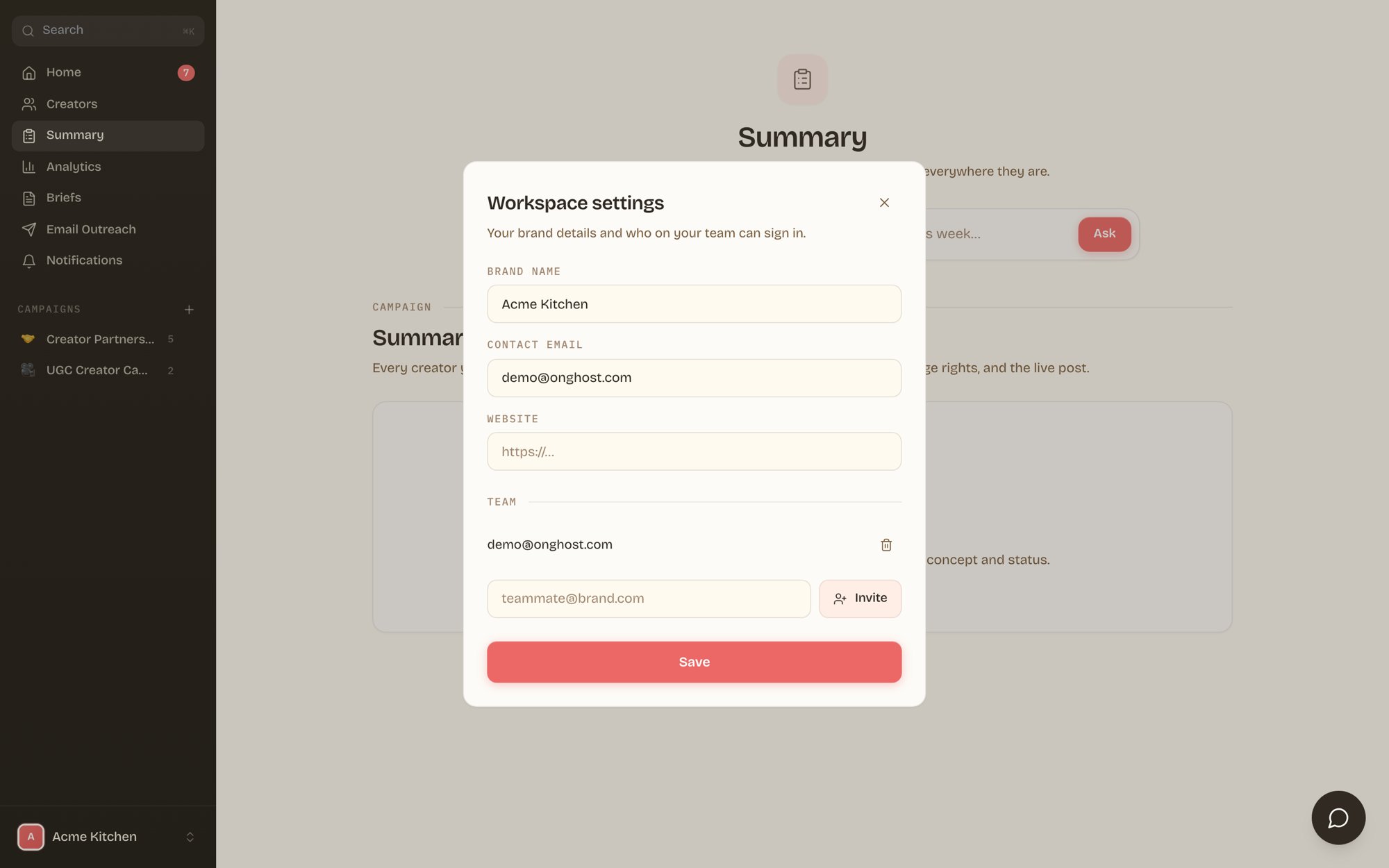
Workspace settings dialog with brand details and team invites
To add a teammate, type their work email and click Invite. They sign in at brands.onghost.com with a magic link, no password setup needed. Remove access anytime with the trash icon next to their email.
Invites are workspace-scoped. A teammate you invite sees your brand’s campaigns and nothing else.

Billing

Brands on a self-serve plan manage their subscription through the hosted billing portal. Open the workspace menu and choose Manage billing to update cards, view invoices, or change plans. If you don’t see it, your billing runs through your Ghost agreement, and your Ghost contact handles it.

Your Slack channel

Ghost runs campaign communication in a shared Slack channel. If your channel invite is pending, the portal shows a join your Slack channel banner until you’re in. Prefer everything in one place? The portal’s ask bar and WhatsApp notifications cover approvals and questions without Slack.

Connect your AI

Connect your AI links your workspace to Claude or ChatGPT so you can review creators and pull performance without opening the portal. Full setup guide: Connect your AI.